


Manual
Read more about how Fietsknoop works.
Also watch our instruction videos in Dutch! Instructievideo's
Route speed
When you make a recording of a route, you will find the recording in Trips. A Trip shows exactly how you walked or cycled, including where you might have deviated from the original route.
Here's how it works.
App:
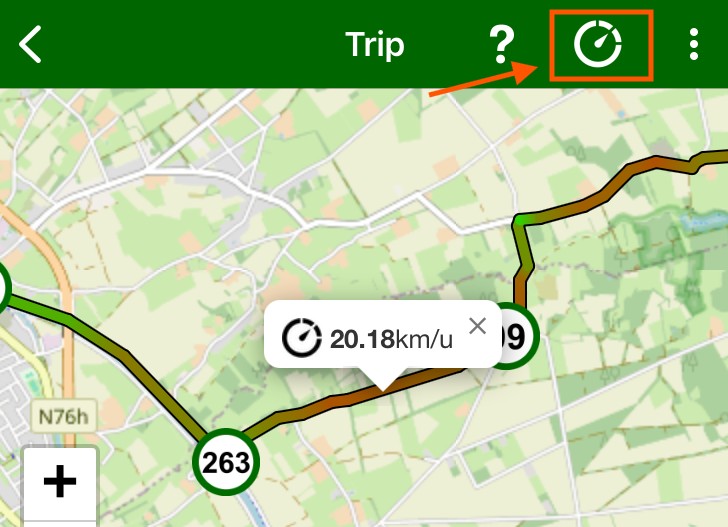
Open the app and click on Trips. Open the appropriate recording in Trips. In the top green bar, you will see a speed symbol. Click it and the speed is displayed in a gradient from blue to green to red in various shades. Touch the route with your finger and a pop-up will show the speed.
Website:
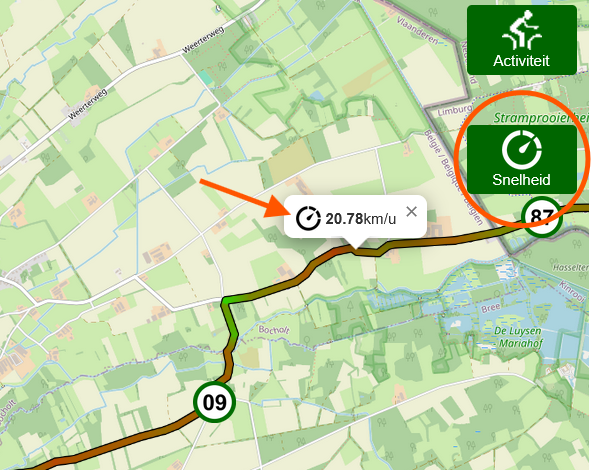
Log in to your account on the website. On your own dashboard page, you will see eight blue blocks on the right. Choose Trips. Open the desired Trip and click the Speed button (= Snelheid), on the right of the map.
Put the cursor on the route to see what the speed was.
#speed #route #recording #trips
https://www.fietsknoop.nl/info/handleiding-item/191/1
- Advertentie -